
Searching for the best flashcard app can feel overwhelming. There are dozens of options, each claiming to be the fastest, smartest, or most feature-packed solution for studying.
I’ve spent hours testing the most popular free flashcard makers available in 2025, and in this guide, I’ll break down exactly what each tool does well (and where it falls short) so you can choose the right one for your needs.
Quick Comparison Table
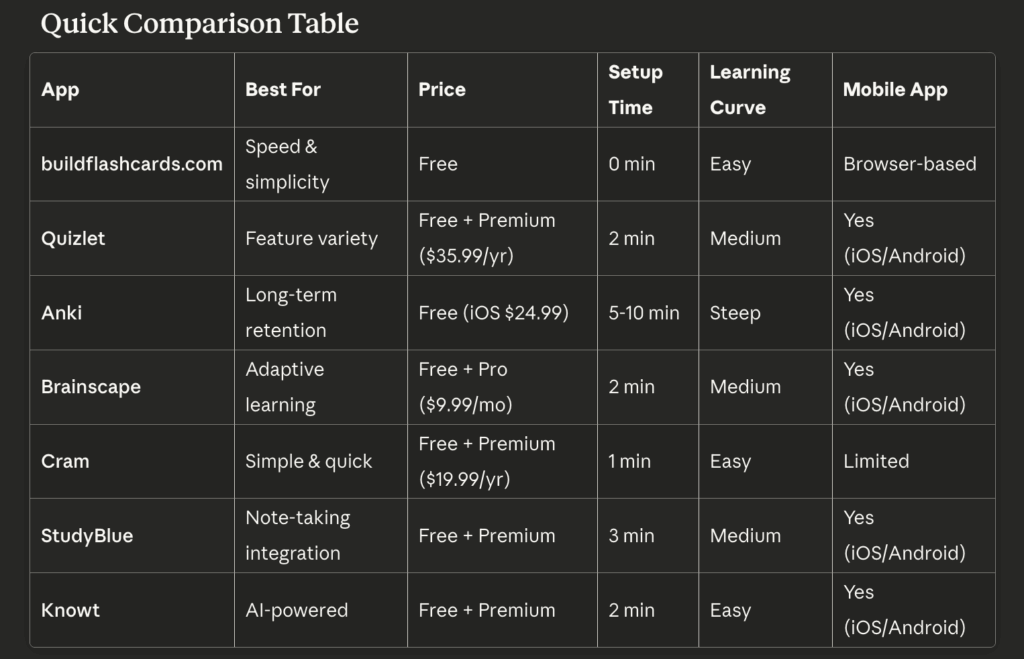
The 7 Best Free Flashcard Makers (Detailed Reviews)
1. buildflashcards.com — Best for Speed and No-Friction Creation
Overall rating: 9/10 for quick studying
What it does well: If you need flashcards in the next 5 minutes, this is your tool. Buildflashcards.com has zero barriers to entry—no account creation, no app download, no tutorial to complete. You land on the page and immediately start creating cards.
The interface is intentionally minimal: one field for questions, one for answers, and a big “Study” button. That’s it. No feature bloat, no distracting gamification, no ads interrupting your flow.
Key features:
- Instant start (no signup required)
- Clean, distraction-free interface
- Immediate study mode
- Works perfectly on mobile browsers
- No storage limits on free plan
- Export options available
Where it excels:
- Creating cards faster than any competitor (tested: 20 cards in 3.5 minutes)
- Last-minute study sessions
- Students who want simplicity over complexity
- Anyone frustrated by cluttered interfaces
Limitations:
- No spaced repetition algorithm (yet)
- No community decks to browse
- Fewer study modes than Quizlet
- No native mobile app (browser-based only)
Pricing: Completely free
Best for: Students who value speed and simplicity above all else. If you’re the type who just wants to make flashcards and study them without learning a complex system, this is your winner.
2. Quizlet — Best for Feature Variety and Community Decks
Overall rating: 8/10 for comprehensive studying
What it does well: Quizlet is the 800-pound gorilla of flashcard apps. With over 60 million active users, it offers the most features, the largest library of user-created content, and multiple study modes that go beyond basic flashcards.
The real strength is variety. You can study the same content as traditional flashcards, matching games, practice tests, or even “Quizlet Live” team competitions. If you get bored with one format, switch to another.
Key features:
- 500+ million user-created study sets
- Multiple study modes (Learn, Test, Match, Gravity game)
- AI-powered question generation (Premium)
- Diagram support
- Audio pronunciation
- Progress tracking and analytics
- Class/group functionality for teachers
Where it excels:
- Finding pre-made decks for popular subjects (AP classes, language learning, medical terms)
- Varied study approaches to prevent boredom
- Collaborative studying with classmates
- Visual learners (images and diagrams integrate well)
Limitations:
- Can feel overwhelming for beginners (lots of buttons and options)
- Free version has ads between study sessions
- Some features locked behind premium paywall
- Setup takes longer than simpler alternatives
- Interface has gotten more cluttered over the years
Pricing:
- Free (with ads and limited features)
- Quizlet Plus: $35.99/year (ad-free, offline access, image upload)
- Teacher plans available at higher tiers
Best for: Students who want maximum flexibility in how they study, or anyone looking to use pre-made decks rather than creating from scratch. Also excellent for teachers managing multiple classes.
3. Anki — Best for Long-Term Retention and Power Users
Overall rating: 9/10 for serious students (7/10 for beginners)
What it does well: Anki is the tool medical students, law students, and language learners swear by. Its spaced repetition algorithm is the most sophisticated available, scientifically optimized to show you cards right before you’re about to forget them.
This isn’t a casual study app—it’s a serious retention system. If you’re studying for boards, the bar exam, or trying to achieve fluency in a foreign language, Anki’s approach is proven to work.
Key features:
- Advanced spaced repetition algorithm (SM-2 and variants)
- Unlimited customization (card types, templates, add-ons)
- Sync across all devices
- Powerful add-on ecosystem
- Statistics and analytics dashboard
- Support for images, audio, video, LaTeX
- Active community and forums
Where it excels:
- Long-term memory retention (months and years)
- High-volume studying (thousands of cards)
- Medical/dental/law school content
- Language learning with audio
- Users who want complete control over every aspect
Limitations:
- Steep learning curve (expect 1-2 hours to feel comfortable)
- Interface looks dated (functional but not pretty)
- iOS app costs $24.99 (Android and desktop are free)
- Overwhelming number of options for casual users
- Takes longer to create cards initially
Pricing:
- Desktop (Windows/Mac/Linux): Free
- Android: Free
- iOS: $24.99 one-time purchase
- AnkiWeb sync: Free
Best for: Serious students committed to long-term learning. If you’re studying for something months or years away, invest the time to learn Anki. If you need to cram for next week’s quiz, use something simpler.
4. Brainscape — Best for Adaptive Learning
Overall rating: 7.5/10 for confidence-based studying
What it does well: Brainscape’s unique approach asks you to rate your confidence on each card (1-5 scale), then shows you cards you’re less confident about more frequently. It’s a middle ground between simple flashcards and Anki’s complex algorithm.
The interface is polished and modern, and the confidence-rating system helps you focus on your weak spots without requiring algorithm expertise.
Key features:
- Confidence-based repetition
- Large marketplace of certified decks (many paid)
- Web and mobile apps sync seamlessly
- Progress tracking and analytics
- Clean, modern interface
- Study reminders
Where it excels:
- Students who want spaced repetition without Anki’s complexity
- Self-awareness training (knowing what you don’t know)
- Professional exam prep (Brainscape sells certified decks for MCAT, GRE, etc.)
Limitations:
- Best content requires purchasing certified decks ($10-50+ each)
- Free version has limited features
- Smaller community than Quizlet
- Less customization than Anki
Pricing:
- Free (limited features, create unlimited cards)
- Pro: $9.99/month or $59.99/year
- Certified decks: Sold separately
Best for: Students preparing for standardized tests who want to purchase high-quality pre-made content, or anyone who likes the concept of spaced repetition but finds Anki too complicated.
5. Cram — Best Simple Alternative to Quizlet
Overall rating: 7/10 for straightforward studying
What it does well: Cram.com is like Quizlet’s simpler cousin. It offers basic flashcard functionality, multiple study modes, and a decent library of user-created content—but with less clutter and fewer premium upsells.
The interface is clean and intuitive, making it easy to create and study cards without distraction.
Key features:
- Multiple study modes (Memorize, Test, Match)
- User-created deck library
- Mobile-responsive website
- Print flashcards option
- Study games
- No ads on free version (rare!)
Where it excels:
- Ad-free experience on free tier
- Simpler interface than Quizlet
- Good for traditional flashcard studying
- Printing options for those who want physical backup
Limitations:
- Smaller community than Quizlet (fewer pre-made decks)
- Mobile apps less polished than competitors
- Fewer advanced features
- Less active development (site feels dated)
Pricing:
- Free (full features, no ads)
- Premium: $19.99/year (offline access, advanced analytics)
Best for: Students who want Quizlet-style functionality without the ads and complexity, or anyone who values a clean interface over cutting-edge features.
6. StudyBlue — Best for Note-Taking Integration
Overall rating: 6.5/10 for organized students
What it does well: StudyBlue tries to be your all-in-one study hub, combining flashcards with note-taking, document storage, and study guides. If you want everything in one place, it’s worth considering.
The flashcard functionality is solid but not exceptional. Where StudyBlue differentiates itself is the ability to turn your class notes directly into flashcards and organize everything by class and chapter.
Key features:
- Flashcards, notes, and study guides in one platform
- Convert notes to flashcards
- Class organization system
- Track study progress by course
- Collaboration features
- Quiz yourself from notes
Where it excels:
- Students who want unified study materials
- Organizing content by class/chapter/topic
- Converting existing notes into study materials
Limitations:
- Interface feels cluttered
- Premium features necessary for best experience
- Mobile app can be buggy
- Slower than dedicated flashcard-only tools
- Company was acquired and development has slowed
Pricing:
- Free (limited features)
- Premium: $7.99/month or $47.99/year
Best for: Students who want one platform for all study materials rather than juggling separate apps for notes and flashcards. Less ideal if you just want fast flashcard creation.
7. Knowt — Best AI-Powered Flashcard Generator
Overall rating: 7.5/10 for AI assistance
What it does well: Knowt leverages AI to automatically generate flashcards from your notes, PDFs, or lecture slides. Upload your study materials, and Knowt extracts key concepts and creates question-answer pairs for you.
This is genuinely useful for dense reading material or long lecture transcripts where you’d otherwise spend an hour manually creating cards.
Key features:
- AI flashcard generation from notes/PDFs
- Import Quizlet decks
- Spaced repetition algorithm
- Practice tests and matching games
- Clean, modern interface
- Free unlimited flashcards
Where it excels:
- Converting lecture notes or textbook chapters into flashcards quickly
- Students with large amounts of reading material
- Importing and improving existing Quizlet decks
Limitations:
- AI isn’t perfect (expect to edit 20-30% of generated cards)
- Still requires review time after generation
- Less control than manual creation
- Newer platform (smaller community)
Pricing:
- Free (unlimited flashcards, limited AI generations)
- Premium: $9.99/month (unlimited AI, advanced features)
Best for: Students dealing with heavy reading loads who want AI assistance extracting key points. Not ideal if you prefer the control and retention benefits of manually creating cards.
How to Choose: Decision Framework
Still not sure which tool to pick? Answer these questions:
“I have less than 10 minutes to create flashcards right now” → Use buildflashcards.com or Cram
“I want to find flashcards someone else already made” → Use Quizlet (largest library) or Brainscape (certified quality decks)
“I’m studying for something 6+ months away and want maximum retention” → Use Anki (but budget time to learn it)
“I want lots of different ways to study the same content” → Use Quizlet (most study modes)
“I have a ton of lecture notes I need to convert to flashcards” → Use Knowt (AI generation) or StudyBlue (note integration)
“I just want the simplest possible experience” → Use buildflashcards.com or Cram
“I’m willing to pay for the best experience” → Anki (one-time iOS purchase) or Brainscape Pro (for certified decks)
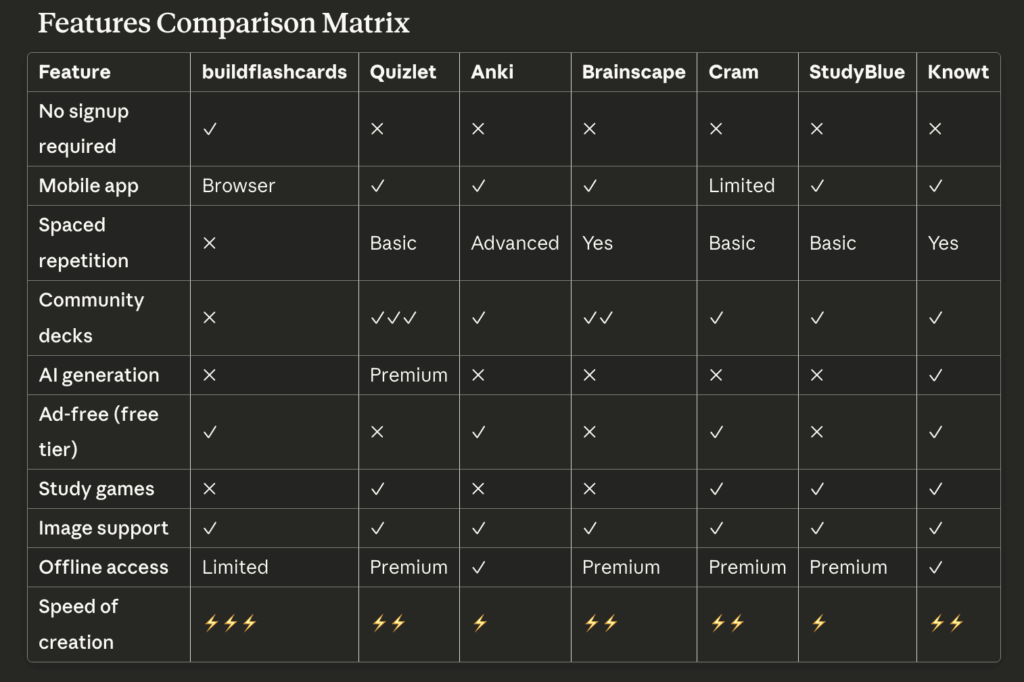
Features Comparison Matrix
Real Student Use Cases
Let me share how different students might choose different tools:
Sarah – Pre-med sophomore: Uses Anki religiously for biology, chemistry, and anatomy. She’s studying content she’ll need to remember for the MCAT two years from now. The investment in learning Anki pays off with superior long-term retention. She spends 30 minutes daily reviewing cards.
Marcus – High school junior: Uses Quizlet for Spanish vocab and AP History. He loves the matching games for memorizing dates and finds pre-made decks for most of his textbooks. The variety keeps studying from feeling monotonous.
Jennifer – College freshman: Uses buildflashcards.com for last-minute quiz prep. She has a busy schedule and values tools that don’t require setup. She creates focused 15-20 card decks the night before exams and studies them on her phone during her commute.
David – Law school 1L: Uses Anki for case law and legal principles. He imports decks from upperclassmen and customizes them. He knows he needs these concepts for both exams and the bar exam years from now, so the advanced spaced repetition is essential.
Emma – Graduate student: Uses Knowt to convert her lengthy research paper notes into flashcards. She uploads PDFs of journal articles and lets AI extract key points, then refines the cards manually. Saves her hours of manual card creation.
My Honest Recommendation
Here’s my no-BS advice after testing all these tools:
For 80% of students: Start with buildflashcards.com or Cram for speed and simplicity. Most people overthink flashcard apps. You don’t need sophisticated algorithms or 47 study modes—you need to quickly create cards and review them repeatedly.
For long-term studying: Invest time learning Anki. Yes, it’s harder to learn. Yes, the interface is ugly. But if you’re studying medicine, law, languages, or anything requiring years of retention, it’s the gold standard for a reason.
For variety seekers: Use Quizlet. If you get bored easily or want to browse community content, Quizlet’s feature set and user base are unmatched.
For AI assistance: Try Knowt if you’re drowning in lecture notes. Just budget time to review and edit the AI-generated cards.
The Tool Doesn’t Matter As Much As You Think
Here’s the truth that gets lost in these comparisons: the tool matters far less than actually using it consistently.
A “perfect” flashcard app that you never open is worthless. A basic tool you actually use daily will transform your grades.
I’ve seen students with simple paper flashcards outperform peers using sophisticated digital systems because they actually studied every day. Don’t let choosing the “perfect” app become procrastination.
Pick one, create your cards, and start studying. You can always switch later if needed.
Bottom Line
Best overall for most people: buildflashcards.com (speed and simplicity win)
Best for power users: Anki (if you’re willing to learn it)
Best for variety: Quizlet (most features and community content)
Best for AI help: Knowt (converts notes to cards)
The best flashcard app is the one that gets you studying fastest. For most students, that means choosing the simplest tool that removes all barriers between “I need to study” and “I’m actually studying.”
Ready to create flashcards in under 5 minutes? Try buildflashcards.com—no signup, no downloads, just immediate studying.
Leave a Reply